
Nintendo Switch Charger Watts And Stop Frying Your Console Today
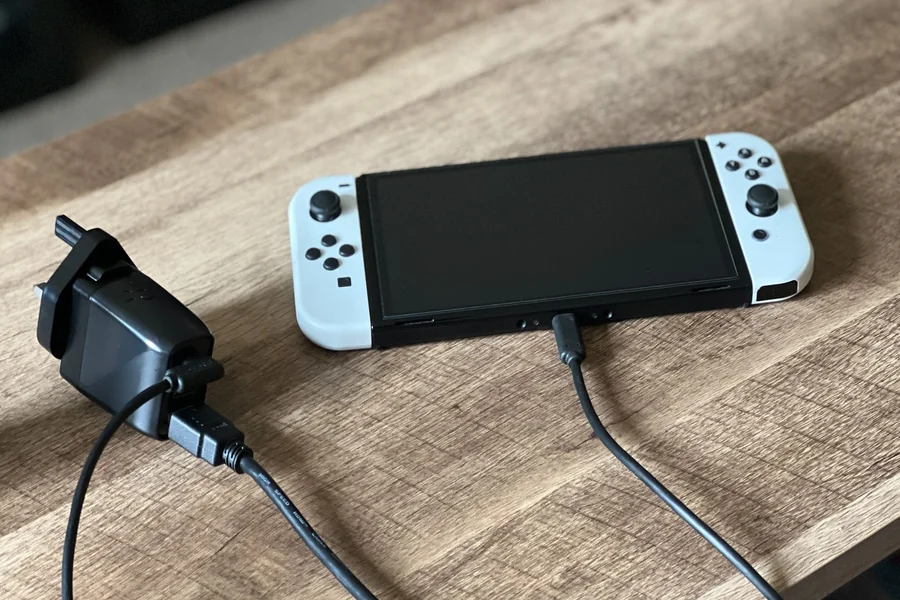
Getting power to a portable gaming device sounds simple. It really is not. The topic of Nintendo Switch Charger Watts is actually a huge headache for many gamers today. People plug their expensive consoles into cheap phone blocks. Then they wonder why the battery takes ten hours to fill up. Sometimes the device even breaks completely. This is a real problem in the gaming world.
Nobody likes a dead battery. It ruins the fun completely. You are right in the middle of a big boss fight. The screen goes dark. It is the absolute worst feeling. Understanding how power works can save your device. It keeps the battery healthy for years. It stops you from buying the wrong gear at the store. Let us break down the real facts about keeping this console alive.
A simple wall plug looks harmless. However, electricity is complicated. Sending the wrong amount of juice to a computer chip is dangerous. The battery inside your gaming machine is highly sensitive. It needs exactly the right type of food to survive. So, learning about watts is not just boring science. It is a necessary skill for anyone who loves video games. You spend hundreds of dollars on equipment. A little bit of knowledge protects that investment perfectly.
Understanding The Real Power Needs
The Nintendo Switch is a weird piece of tech. It is a handheld machine. It is also a home console. Because it plays a double role, the power demands are very specific. The official plug that comes in the original box is a heavy brick. There is a good reason for that large size. That specific plug pushes out 39 watts of energy.
This specific number is very important. Most basic phone plugs only push out five or ten watts. That is just a tiny trickle of energy. Imagine trying to fill a giant swimming pool with a small drinking straw. It takes forever. The gaming console needs a big hose to get enough power quickly. That big hose is the official charger.
When the console sits in the television dock, it works much harder. The dock sends video to your big screen. The dock powers the extra USB ports on the side. The console needs all the power it can get to run the graphics chip at full speed. This is why a regular phone block just fails. It cannot give enough juice to keep the television screen running. The console will simply reject a weak plug. It knows what it needs. So, it refuses to turn on the television signal at all. You just get a sad black screen.
Why Fast Charging Is A Total Mess Sometimes
Power delivery is a complicated thing. Watts are just a simple way to measure the flow of power. More watts equal more energy hitting the battery at once. The gaming industry uses a special rulebook for this called Power Delivery. People usually just call it PD. This PD rulebook helps the charging block and the console talk to each other.
They have a tiny digital conversation. The plug asks the console how much energy it can handle safely. The console says it needs exactly 15 volts and 2.6 amps. When you multiply 15 by 2.6, you get exactly 39. That is the magic number. If the plug does not speak the PD language, the console gets scared. It limits the power to a tiny drip just to be safe.
This is why some expensive laptop plugs still charge the console very slowly. The plug might have a massive 100-watt rating. But if it lacks the right PD profile, the console shuts down the fast lane. It takes over five hours to fill the battery on the slow lane.
With the correct block, it takes about three hours. Time is money. Waiting five hours to play a game is just ridiculous for anyone. Look, nobody wants to wait around. You want to grab your machine and play. Fast charging is totally possible. You just need a wall block that speaks the correct digital language.
The Right Gear For Your Gaming Bag
Buying extra cables is always a confusing trip to the store. The shelves are packed with cheap junk. Not all cables are safe. Not all charging blocks do what the box claims. Having the right tools makes traveling much easier. You never want to be stranded at an airport with a dead console. Building a good travel kit solves this problem entirely.
Here is exactly what every gamer needs to carry in their bag:
- A heavy-duty power bank is essential. It must clearly list Power Delivery on the outside box.
- You also need a car lighter adapter. This adapter should push out at least 30 watts to keep up with a heavy gaming session.
- A certified high-speed USB-C cord is required. Cheap cords can actually melt if they carry too much power.
- Do not forget a hard shell carrying case. Cables easily bend and break in a messy backpack.
- Finally, leave the official Nintendo brand adapter at home. Keep it plugged into the main television dock permanently. Buy separate gear just for traveling.
Docked Mode Versus Handheld Mode Differences
There is a massive difference in how the machine eats power. You have to treat docked mode and handheld mode like two different animals. In handheld mode, the tiny screen uses most of the battery. The internal graphics chip actually slows down significantly. It does this on purpose to save energy.
Because the system runs slower in your hands, it does not need a massive power flow to stay alive. You can actually use a good 20-watt plug from a tablet. It will fill the battery slowly. It will keep the game running. For a kid in the backseat of a car, a 20-watt plug does the job fine. It is not perfect. But it works nicely in an emergency.
The television dock is a completely different story. The dock is demanding. It wants the full 39 watts immediately. If you try to use a weak 20-watt block on the dock, nothing happens. The television stays black.
An error message might pop up on the little screen telling you to use the official adapter. Industry veterans always say the exact same thing. Do not mess around with the television dock. It requires specific power to run the video output chip. Handheld gaming gives you much more freedom with your power choices.
Dodging Sketchy Cheap Plugs Online
Everyone wants to save a few dollars. Buying a cheap replacement plug online seems smart at first. It is actually a terrible idea. The internet is flooded with poorly made electronics. These cheap plugs cut important corners. They skip vital safety chips inside the plastic casing.
Sometimes they send huge spikes of electricity right into the console. When a bad plug sends too much power, it fries the main circuit board entirely. The gaming console goes completely dead. It will never turn on again. Gamers call this problem “bricking” the device.
It turns your expensive machine into a useless plastic brick. You lose all your saved game files instantly. Nobody wants to lose a hundred hours of hard work because of a five-dollar plug. Always look for trusted brand names. Companies like Anker or Ugreen make really good stuff.
Always check the fine print on the side of the plug. Look for the letters PD printed on the back. Feel the weight of the block in your hand. If it feels as light as a feather, it is probably missing important safety parts. Throw it right in the trash. It is just not worth the massive risk to your gaming system.
Saving Battery Life On Long Trips
Knowing about Nintendo Switch Charger Watts is highly useful. However, just saving the battery you already have is even better. You do not have to hunt for a wall plug if your battery lasts longer. Changing a few basic settings adds an extra hour of playtime easily.
The easiest fix is the screen brightness. Turn it down right away. The screen is like a giant flashlight eating your battery. Lower it until it is just comfortable to read. The next big step is turning off the internet. The console constantly searches for wi-fi signals in the background.
This drains power incredibly fast. Turn on Airplane Mode in the system settings. The battery will absolutely thank you. Another secret trick is turning off the controller vibrations. The little motors inside the controllers use real electricity to shake.
Turn them off in the main controller menu. It feels a little less exciting to play. But it saves precious energy. Every single drop of power counts when you are stuck on a long airplane flight. You might have nowhere to plug in for six hours. Smart battery management keeps the boredom away.
Keeping Your Device Alive
Keeping a portable console alive is serious business today. Getting the power details wrong leads to a dead battery or a broken machine. Stick to the magic number of 39 watts for the television dock. Buy travel gear that actually speaks the Power Delivery language. Protect your device from cheap electronic knockoffs at the local gas station. They are simply bad news.
You really need to respect the hardware. Electricity is a powerful tool. When managed correctly, your portable screen will shine brightly for hours. So, do your homework before buying random cords. Read the tiny numbers on the back of the charging block. If you follow these simple rules about Nintendo Switch Charger Watts, your gear will last. The console will easily survive hundreds of long gaming trips without breaking a single sweat. Happy gaming.
FAQs
Is it safe to use a standard phone plug?
Yes, it is generally safe for handheld play. However, it provides power very slowly. It might not charge the battery at all if you are playing a heavy 3D game.
Can a large laptop plug ruin the console?
No. A high-quality laptop plug with Power Delivery is perfectly safe to use. The gaming console only pulls the exact amount of power it actually needs.
Why does my television stay black with a new cord?
The television dock requires a very specific power profile to wake up. Most cheap replacement cords fail completely to meet this strict requirement.
How long does a full battery take?
Using the official wall plug, a completely empty console takes about three hours. It needs to reach one hundred percent while sitting in sleep mode.